Moving off Viva Goals? Keep your OKRs - and see where they'll land
Objectives, key results, check-ins and quarters work the way your team is used to. What's new: every key result gets a forecast to its target date, so the review meeting starts with what's slipping, not with collecting numbers.
Viva Goals and GoalNexa, side by side
| Viva Goals | GoalNexa | |
|---|---|---|
| Available | No - retired December 31, 2025 | Yes, hosted or on your own server |
| Status of an OKR | From the gap between actual and expected progress (a straight line from start to end date); can be set by hand | From a forecast: each metric's trend carried to the target date - on track, at risk, off track or achieved |
| Pricing model | Licensed per user (on its own or in the Viva suite) | Flat price per team; members join free (pricing) |
| Microsoft Teams | Teams app | No Teams app - a web link, the Android app, email digests |
| Check in from | Web, Teams, data integrations | Web, Android app, your AI assistant (Claude, Codex, Cursor, ...), a per-metric URL for scripts |
| Initiatives / projects | Yes | No - goals and numbers only; keep tasks in your project tool |
| If the vendor stops | Exports (Excel, PowerPoint, API) until the shutdown date | Download your data any time; the source is public, so you can run it yourself |
Facts about Viva Goals checked 2026-10-24 - sources at the end of the page.
Same ideas, different words
| In Viva Goals | In GoalNexa |
|---|---|
| Objective | A goal - with sub-goals for the teams or people under it |
| Key result | A metric: start → target, in its unit (it may go down, like costs) |
| Check-in | A check-in: the new number and a note, dated when you say |
| Status (on track, behind, at risk) | Health (on track, at risk, off track, achieved), computed from the forecast |
| Time period | A cycle - goals join it, and closing it scores each goal 0-1 |
| Alignment (parent OKR) | Sub-goals under a goal |
| Teams | An organization with teams; a goal template gives each team its own copy |
| Data integrations | Each metric's own check-in URL - send numbers from scripts or automation tools |
| Dashboards | The dashboard, the team board, and a public link to share a live view |
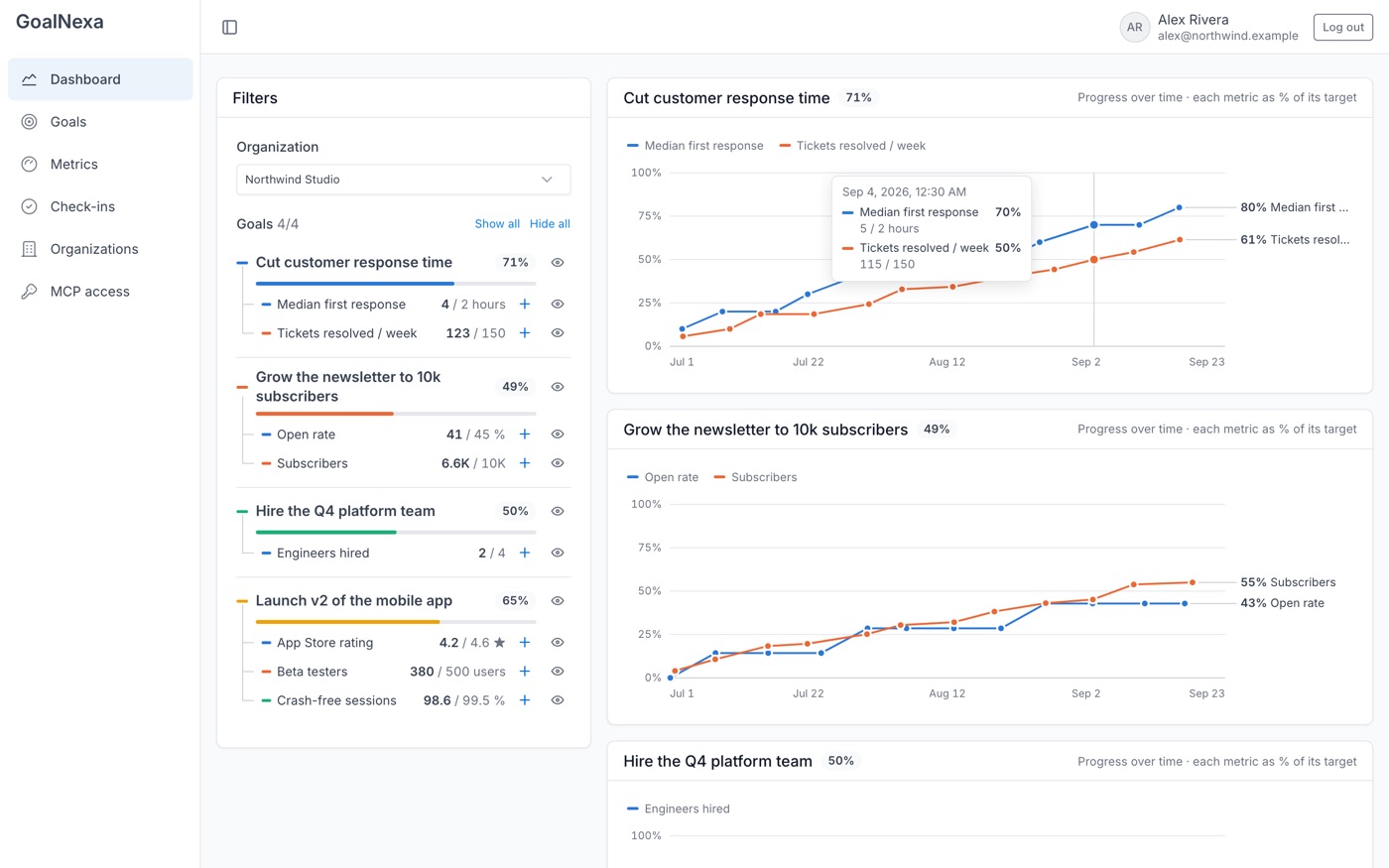
Know mid-quarter which key results won't make it
- One chart per goal: each key result's progress over time and where its pace lands it by the target date.
- A health badge per goal, from the numbers - nobody picks a color.
- Reminders when a check-in is due, and a daily or weekly digest email.
Updates that take seconds
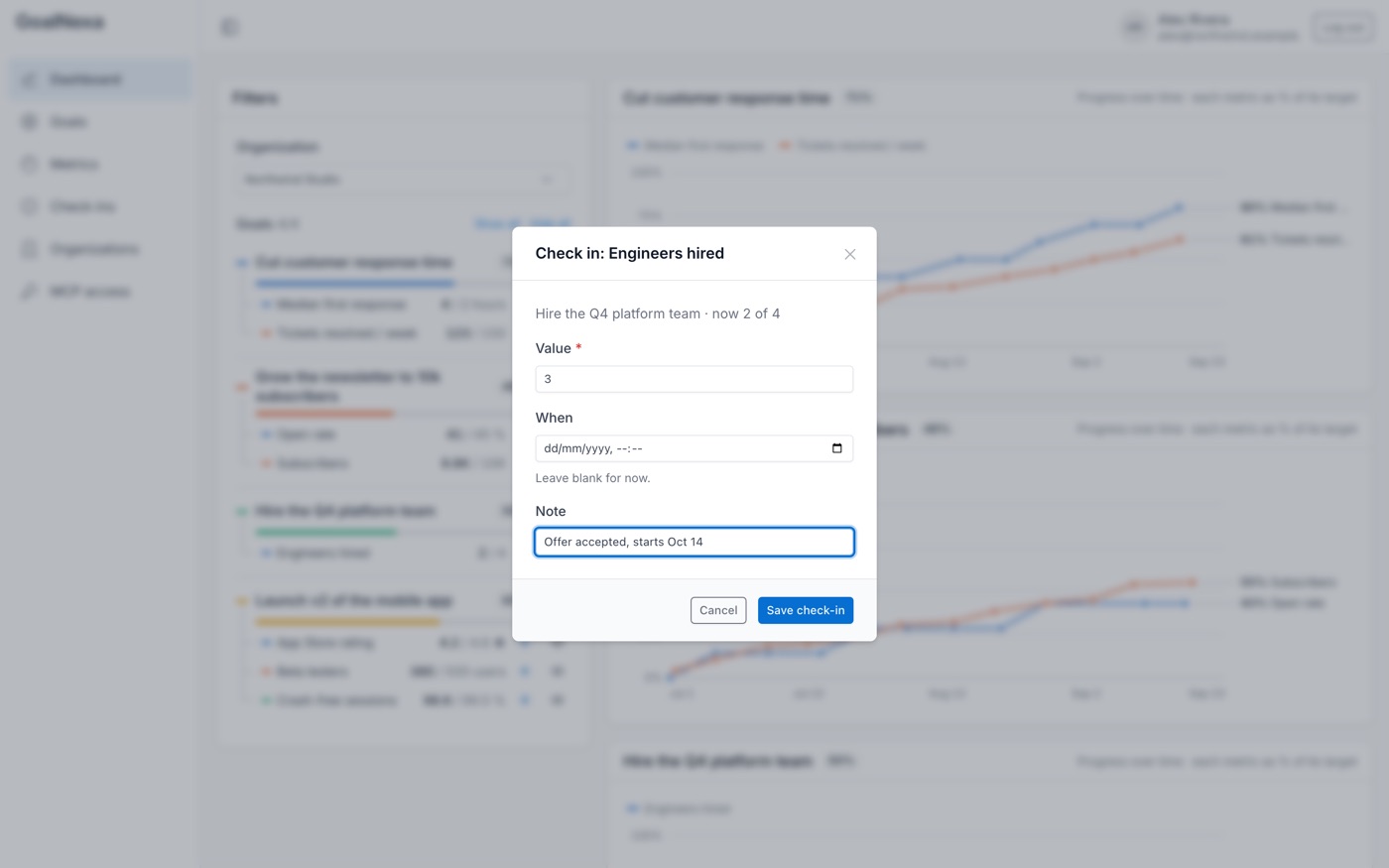
- Check in on the web or the Android app.
- Or tell your AI assistant "we're at 420 beta users" - it finds the key result and logs it.
- Numbers from other systems come in through each metric's own check-in URL.
Quarters, scores and many teams
- Cycles for your quarters; closing one scores every goal 0-1 and can roll unfinished ones into the next.
- Set up the same OKRs for many teams with a goal template; totals add up per team and for the organization.
- Public or private goals, roles for owners and admins, invitations by link.
Not another tool that can disappear
- Download all your data as JSON from your account page, any time.
- The source is public (GitHub) - run it on your own server with Docker if you'd rather hold it yourself.
- Self-hosted, you can sign in with your company's identity provider (OpenID Connect - Microsoft Entra ID works).
When GoalNexa isn't the right pick
- Your team works inside Microsoft Teams and wants OKRs there - GoalNexa has no Teams app.
- You track initiatives and projects next to key results in one tool - GoalNexa tracks goals and numbers, not tasks.
- You're rolling OKRs out to hundreds of people with a formal vendor review - a larger OKR vendor will have the compliance paperwork and account team for it.
- You want people to set a confidence level on each check-in - GoalNexa doesn't have that yet.
Moving from Viva Goals
Find your export
Viva Goals offered exports to Excel, PowerPoint and its API until December 31, 2025. Open the file you saved - or your last review deck.
Create your organization
Sign up, name the organization and invite the team by link. Members join free.
Recreate your OKRs
Add goals and metrics in the app, or paste your export into an AI assistant connected to GoalNexa and ask it to set them up - it shows you a draft first.
Bring the history (optional)
Check-ins can be dated in the past, so last quarter's readings draw the same trend they did.
Questions
- Can I still get my data out of Viva Goals?
- Microsoft says Viva Goals and its data are no longer accessible after December 31, 2025. If you exported to Excel or PowerPoint before then, that file is your starting point; otherwise start from your last review notes.
- Is there a one-click import from Viva Goals?
- No. Add goals by hand, or connect an AI assistant (Claude, Codex, Cursor and others) to GoalNexa and give it your export - it creates the goals, key results and past check-ins after you confirm a draft.
- Does GoalNexa work with Microsoft Teams?
- There is no Teams app. Teams share goals inside an organization, see them on the dashboard, get email digests and reminders, and can share a live dashboard with a public link.
- Is it priced per user?
- No. Each plan has one flat price for a team, and members join free. See pricing.
- What if GoalNexa shuts down too?
- You can download your data any time, and the source code is public under the PolyForm Shield license, so you can run your own copy on your own server.
Other comparisons
- Perdoo alternative
- Tability alternative
- Weekdone alternative
- Quantive alternative
- Lattice Goals alternative
Sources
Set up your team's next quarter in an afternoon.
Start free - one flat price per team when you need more room. See pricing.